User Guide
LingoGO! is a desktop app for university students who use English as their first language and are trying to learn a new language, optimized for use via a Command Line Interface (CLI) while still having the benefits of a Graphical User Interface (GUI). With digital flashcards, LingoGO! can make learning faster and more convenient compared to using than traditional flashcards.
- Quick start
-
Features
- Viewing help :
help - Adding a flashcard:
add - Listing all flashcards :
list - Editing a flashcard :
edit - Locating flashcards by keyword:
find - Deleting a flashcard :
delete - Clearing all entries :
clear - Uploading cards :
upload - Downloading cards :
download - Exiting the program :
exit - Flipping a flashcard :
flip - Testing with a flashcard :
test - Saving the data
- Editing the data file
- Viewing help :
- FAQ
- Command summary
Quick start
-
Ensure you have Java
11or above installed in your Computer. -
Download the latest
lingogo.jarfrom here. -
Copy the file to the folder you want to use as the home folder for LingoGO!.
-
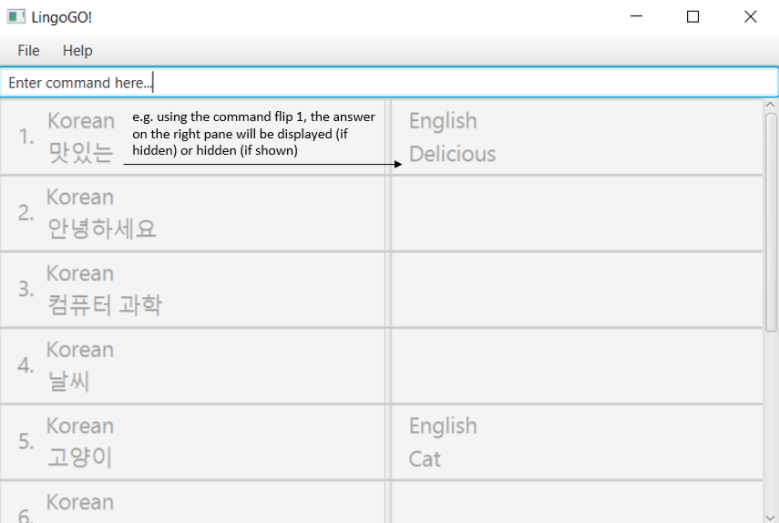
Double-click the file to start the app. The GUI similar to the below should appear in a few seconds. Note how the app contains some sample data.
-
Type the command in the command box and press Enter to execute it. e.g. typing
helpand pressing Enter will open the help window.
Some example commands you can try:-
list: Lists all flashcards. -
adde/Good Morning f/早安: Adds a flashcard with English phraseGood Morningand corresponding foreign phrase早安to LingoGO!. -
delete3: Deletes the 3rd flashcard shown in the current displayed list. -
clear: Deletes all flashcards. -
edit3f/Guten Morgen: Edits the foreign phrase of the 3rd flashcard shown in the current displayed list toGuten Morgen. -
upload./dictionary.csv: Imports cards from a CSV file to LingoGO!. -
downloadmyCards.csv: Exports cards from LingoGO! to a CSV file in a file namemyCards.csv. -
exit: Exits the app. -
flip2: Toggles the 2nd flashcard to hide or show the correct English phrase. -
test17hello: Checks flashcard 17’s English phrase against the wordhelloand then shows whether it is correct.
-
-
Refer to the Features below for details of each command.
Features
 Notes about the command format:
-
Words in
UPPER_CASEare the parameters to be supplied by the user.
e.g. inadd e/ENGLISH_PHRASE f/FOREIGN_PHRASE,ENGLISH_PHRASEandFOREIGN_PHRASEare parameters which can be used asadd e/Good Morning f/早安. -
Items in square brackets are optional.
e.g.edit INDEX [e/ENGLISH_PHRASE] [f/FOREIGN_PHRASE]can be used asedit 1 e/Good Morning f/早安or asedit 1 f/早安or asedit 1 e/Good Morning -
Parameters can be in any order.
e.g. if the command specifiesadd e/ENGLISH_PHRASE f/FOREIGN_PHRASE,f/FOREIGN_PHRASE e/ENGLISH_PHRASEis also acceptable. -
If a parameter is expected only once in the command, but you specified it multiple times, only the last occurrence of the parameter will be taken.
e.g. if you specifyedit 2 e/Hi e/Hello, onlye/Hellowill be taken. -
Extraneous parameters for commands that do not take in parameters (such as
help,list,exitandclear) will be ignored.
e.g. if the command specifieshelp 123, it will be interpreted ashelp.
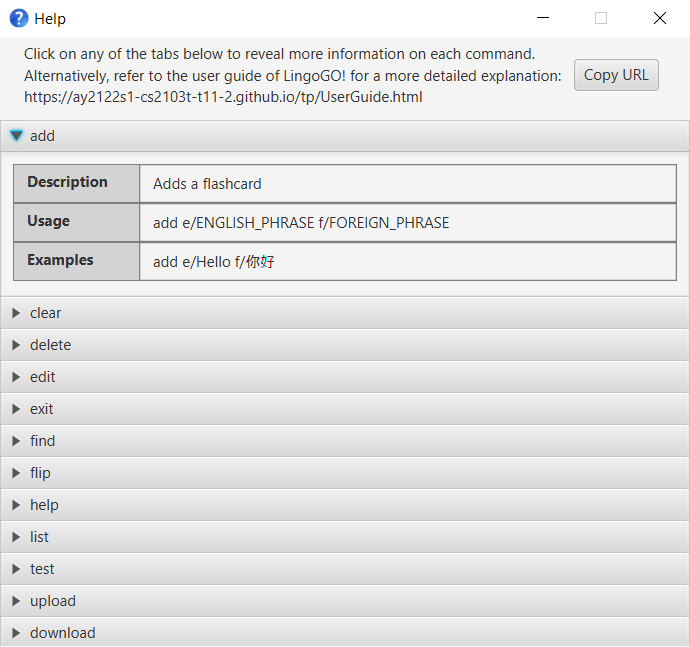
Viewing help : help
Shows a message explaining how to access the help page, as well as dropdowns with brief explanations for each command.
Format: help
Adding a flashcard: add
Adds a flashcard to LingoGO!.
Format: add e/ENGLISH_PHRASE f/FOREIGN_PHRASE
Examples:
add e/Good Morning f/早安add e/Hello f/你好
Listing all flashcards : list
Shows a list of all flashcards in LingoGO!.
Format: list
Editing a flashcard : edit
Edits an existing flashcard in LingoGO!.
Format: edit INDEX [e/ENGLISH_PHRASE] [f/FOREIGN_PHRASE]
- Edits the flashcard at the specified
INDEX. The index refers to the index number shown in the displayed flashcard list. The index must be a positive integer 1, 2, 3, … - At least one of the optional fields must be provided.
- Existing values will be updated to the input values.
Examples:
-
edit 1 e/Good MorningEdits the English phrase of the 1st flashcard to beGood Morning. -
edit 2 f/Guten MorgenEdits the foreign phrase of the 2nd flashcard to beGuten Morgen. -
edit 2 e/Good Morning f/Guten MorgenEdits the English phrase and foreign phrase of the 2nd flashcard to beGood MorningandGuten Morgenrespectively.
Locating flashcards by keyword: find
Finds flashcards based on the keyword specified.
Format: find KEYWORD [MORE_KEYWORDS]
- The search is case-insensitive. e.g
HELLOwill matchHello - The order of the keywords does not matter. e.g.
Good morningwill matchMorning good - Only full words will be matched e.g.
Hellowill not matchHelloooo - Flashcard matching at least one keyword will be returned (i.e.
ORsearch). e.g.Good Hellowill returne/Good Morning f/早安,e/Good Morning f/Guten Morgenande/Hello f/你好
Examples:
-
find Goodreturnse/Good Morning f/早安ande/Good Morning f/Guten Morgen -
find Good Helloreturnse/Good Morning f/早安,e/Good Morning f/Guten Morgenande/Hello f/你好
Deleting a flashcard : delete
Deletes the specified flashcard from LingoGO!.
Format: delete INDEX
- Deletes the flashcard at the specified
INDEX. - The index refers to the index number shown in the current displayed list.
- The index must be a positive integer 1, 2, 3, …
Examples:
-
listfollowed bydelete 2deletes the 2nd flashcard in LingoGO!. -
find Hellofollowed bydelete 1deletes the 1st flashcard in the results of thefindcommand.
Clearing all entries : clear
Clears all flashcards from LingoGO!.
Format: clear
Uploading cards : upload
Imports cards to LingoGO! using a CSV file.
Format: upload CSV_FILE_PATH
- The file path can be absolute or relative to the location of the LingoGO! file.
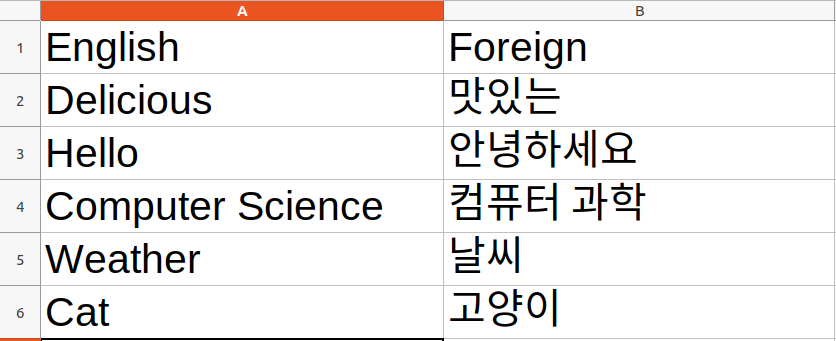
- The CSV file must have 2 columns. The first column is for the English phrase, and the second column is for the foreign phrase.
Examples:
-
upload ./dictionary.csvwill load all cards stored in the dictionary.csv to LingoGO!.
Downloading cards : download
Exports cards from LingoGO! to a CSV file.
Format: download FILE_NAME
- Provides a file name with .csv extension in which the flash cards will be stored and exported.
- The exported file will be added to
datafolder in a CSV format. - The CSV file will have 2 columns. The first column is for the English phrase, and the second column is for the foreign phrase.
Examples:
-
download myCards.csvwill save all cards in LingoGO! to a CSV file namedmyCards.csv.
Exiting the program : exit
Exits the program.
Format: exit
Flipping a flashcard : flip
Toggles the flashcard to either show or hide its English phrase.
Format: flip INDEX
- Toggles the flashcard at the specified
INDEX. - The index refers to the index number shown in the current displayed list.
- The index must be a positive integer 1, 2, 3, …
Examples:
-
flip 3followed byflip 3shows and then hides the English phrase for the 3rd flashcard in the current displayed list.
Testing with a flashcard : test
Checks whether the English phrase of a flashcard matches a given phrase.
Format: test INDEX ENGLISH_PHRASE
- Checks the English phrase of the flashcard at the specified
INDEXwith the givenENGLISH_PHRASE. - The app will then show user the correct English phrase and tell the user whether he got it right.
- The index refers to the index number shown in the current displayed list.
- The index must be a positive integer 1, 2, 3, …
- Testing is only allowed for flashcards that are flipped down (i.e. the English phrase is hidden).
-
ENGLISH_PHRASEis not case-sensitive (e.g. “HeLLo” matches “hello”).
Examples:
-
test 4 hellochecks the 4th card on display to see ifhellomatches the English phrase of the flashcard.
Saving the data
LingoGO! data are saved in the hard disk automatically after any command that changes the data. There is no need to save manually.
Editing the data file
LingoGO! data are saved as a JSON file [JAR file location]/data/lingogo.json. Advanced users are welcome to update data directly by editing that data file.
 Caution:
If your changes to the data file makes its format invalid, LingoGO! will discard all data and start with an empty data file at the next run.
Caution:
If your changes to the data file makes its format invalid, LingoGO! will discard all data and start with an empty data file at the next run.
FAQ
Q: How do I transfer my data to another Computer?
A: Install the app in the other computer and overwrite the empty data file it creates with the file that contains the data of your previous LingoGO! home folder.
Command summary
| Action | Format, Examples |
|---|---|
| Add |
add e/ENGLISH_PHRASE f/FOREIGN_PHRASE e.g., add e/Good Morning f/早安
|
| Clear | clear |
| Delete |
delete INDEXe.g., delete 3
|
| Edit |
edit INDEX [e/ENGLISH_PHRASE] [f/FOREIGN_PHRASE]e.g., edit 2 f/Guten Morgen
|
| Find |
find KEYWORD [MORE_KEYWORDS]e.g., find Hello
|
| List | list |
| Upload |
upload CSV_FILE_PATHe.g., upload ./dictionary.csv
|
| Download |
download FILE_NAMEe.g., download myCards.csv
|
| Help | help |
| Flip |
flip INDEX e.g., flip 2
|
| Test |
test INDEX ENGLISH_PHRASE e.g., test 17 hello
|
| Exit | exit |